 Printhawk
Invoices
Updated
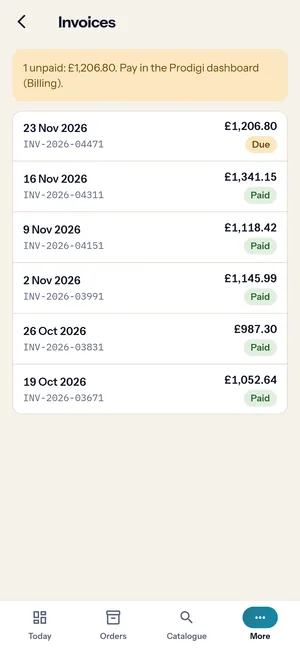
Printhawk lists your Prodigi invoices newest first, with their status and total.
Steps
- Go to More › Invoices, or tap Invoice due on Today.
- Unpaid invoices are summed in a banner: “Pay in the Prodigi dashboard (Billing).”
- Tap an invoice to open its PDF (or the transactions document), then save or share it from the viewer (Pro).
Good to know
- Up to the 50 most recent invoices are listed.
- Paying happens in the dashboard; if a payment fails, check for orders on hold.
More on Prodigi billing and invoices.
Questions
Can I pay a Prodigi invoice in Printhawk?
No. Printhawk shows what is unpaid; you pay in the Prodigi dashboard under Billing.
Is the invoice list free?
Yes, the list and the Invoice due tile on Today are free. Opening the PDF is Printhawk Pro.
Why does an invoice have no PDF?
Prodigi hasn't produced the document yet. Printhawk says so; try again later.
Why do unpaid invoices matter?
A failed payment is the usual reason Prodigi puts orders on hold, so an unpaid invoice can stop production.