 Printhawk
Damaged, wrong or missing Prodigi order: how to report it
Updated
Report it to Prodigi with the order ID, a short description and clear photos: through Prodigi’s damaged-item form, by emailing [email protected], or with the API’s issue endpoint. Prodigi’s support page says delivery damage gets a free reprint. Don’t ask the customer to post anything back unless support asks.
What to send
- The order ID (and your own reference if you use one).
- Which item is affected, if the order had several.
- What went wrong, in one or two sentences: “Frame corner crushed on arrival; the print itself is fine.”
- Photos: the outer box with the label, the damage up close, the whole item. For print quality, a close-up next to something for scale.
Ask the customer for photos the same day. Carriers and labs can only investigate damage that is documented, and a box thrown away is evidence gone.
The reasons Prodigi uses
| Reason | Use it for |
|---|---|
damaged | Broken glass, crushed frame, dented canvas, creased print. |
incorrect | Wrong product, size, paper, frame colour or artwork. |
missing | An item missing from a parcel that arrived. |
quality | Banding, colour far off, soft or pixelated print, smudges. |
shipping | Parcel lost, stuck or returned. See delivery exceptions. |
other | Anything else (a description is then required). |
Reporting through the API
v5 adds POST /orders/{orderId}/issues. Send a reason, a description (up to 1,000 characters, required for other) and up to ten attachments: public links to photos, each up to 2,048 characters. Things to know:
- A
201means Prodigi’s support system has the ticket; the returnedidis the ticket number to quote. - Everything after that happens by email. There is no endpoint to list issues or read their status.
- Photos are added as links and never fetched, so they must stay reachable until the case is closed.
- Send an
Idempotency-Keyso a retry can’t open a second ticket. - It works with
live_keys only. If support can’t be reached the API returns503 support_unavailable; email[email protected]instead.
What Prodigi offers
- Damaged in transit: a free reprint, according to Prodigi’s customer support page.
- Not received: if an order hasn’t arrived within 30 days of being placed, Prodigi’s FAQ says it will send a replacement, except when the address was wrong.
- Prodigi’s error (wrong item, defect): Prodigi says it handles the return and refund at its own expense. Change-of-mind returns are at the merchant’s expense.
Prodigi doesn’t publish a deadline for reporting damage in the FAQ pages we read, so report as soon as the customer tells you.
Reporting from your phone
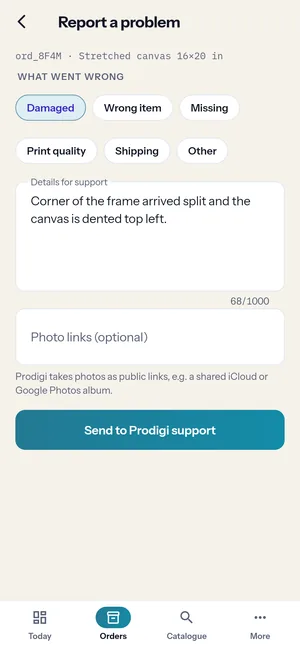
Customers email photos at all hours. In Printhawk, open the order, tap Report a problem, choose the reason, write what happened and paste links to the photos; the app sends it through Prodigi’s issue endpoint and shows the ticket number to quote. See reporting a problem in Printhawk and our guide to customer service for print on demand.
Questions
What does Prodigi do about a damaged print?
Prodigi's customer support page says it organises a free reprint when an item is damaged in delivery. Report it with the order ID, a description and photos.
What if a Prodigi order never arrives?
Prodigi's FAQ says that if an order hasn't arrived within 30 days of being placed it will send a replacement, except where the address was wrong. Check the tracking first.
Should the customer send the damaged item back?
No. Prodigi doesn't take returns of unwanted items, and for damaged or incorrect items it says it may collect them to investigate. Wait for support to ask.
Can I report a problem through the Prodigi API?
Yes, with POST /orders/{orderId}/issues and a reason of damaged, incorrect, missing, quality, shipping or other. It creates a support ticket and returns its number. It works with live keys only.
How do I attach photos to a Prodigi issue?
Through the API you add up to 10 public links to photos; Prodigi adds them to the ticket as links and never downloads them, so keep them online. In the dashboard, use Prodigi's damaged-item form.
Sources
- Prodigi Print API v5 reference: POST /orders/{orderId}/issues, OrderIssueCreateRequest, OrderIssue (prodigi.com/print-api/docs), read 27 November 2026.
- Prodigi customer support page (prodigi.com/customer-support), read 27 November 2026.
- Prodigi FAQ, Shipping (“Why hasn’t my order been delivered yet?”, “What happens if a product arrives damaged or is incorrect?”) and Returns & cancellations (prodigi.com/faq), read 27 November 2026.