 Printhawk
How to change the delivery address on a Prodigi order
Updated
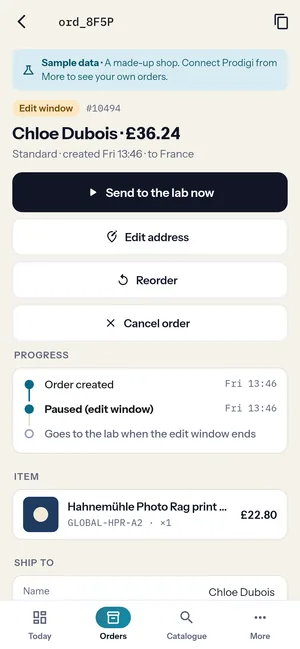
Change a Prodigi address in the dashboard’s order page, or with PATCH /orders/{id} sending only the recipient, before the order is dispatched. The country can’t change. Some labs don’t allow edits once production starts; then email Prodigi support quickly. A pause window keeps edits always possible.
What you can change
The recipient block on a Prodigi order holds:
- Name (up to 100 characters; very long names may be shortened to fit courier labels)
- Address line 1 and 2, town or city, state or county, postcode or ZIP
- Email and phone number (Prodigi recommends a phone number for courier notifications)
- Delivery instructions for the carrier, such as “Leave with neighbour” (support varies by carrier)
The country is fixed. It decides which lab makes the order, the shipping method and the price, so the API returns 400 if you try. Cancel and re-order instead.
In the dashboard
Open the order and edit the delivery address. Prodigi’s FAQ says this works if the order hasn’t been dispatched, but may not be available at every print facility. If you can’t edit it, email [email protected] with the order ID and the new address; support will update it if it isn’t too late.
Through the API
- Read the order. If
allowedActionsincludesupdate, you can try. - Send
PATCH /orders/{orderId}with only therecipientobject. After submission, any other field returns409. - Handle a
409: Prodigi refuses recipient changes once production is too far along. Fall back to support.
This works for paused orders too, which is new in v5: in v4 you couldn’t see paused orders through the API at all.
When it is too late
- Shipped with tracking: many carriers let the recipient redirect a parcel from the tracking page. That is between the customer and the carrier.
- Returned to sender: the return address is the lab. Prodigi says it will contact you for the right address and re-ship at your cost.
- Lost: Prodigi says parcels aren’t always returned; then you place a new order. Its 30-day free replacement for lost orders doesn’t cover an incorrect address.
Avoid the problem
Most wrong addresses are caught by the customer within an hour of ordering. A short edit window turns those into a free fix. Ask for a phone number at checkout, and check unusual postcodes before submitting manual orders. Printhawk’s Change address button (Pro) appears only while Prodigi allows the change, keeps the country fixed, and asks for Face ID before sending it. See changing an address in Printhawk.
Questions
Can I change the country on a Prodigi order?
No. Prodigi lets you edit the address but not the destination country, because the country decides which lab makes the order and what it costs. Cancel it and place a new order instead.
What if the order has already shipped?
Then Prodigi can't change it. Contact the carrier with the tracking number, or ask Prodigi support. If the parcel comes back to the lab, Prodigi re-ships it at your cost.
Who pays if the customer gave the wrong address?
Prodigi's FAQ says the merchant is responsible. Returned parcels are re-shipped at your cost, and lost ones need a new order.
Can I change the address through the Prodigi API?
Yes. Send PATCH /orders/{orderId} with only the recipient object. It can be refused with 409 once production has progressed, and changing the country returns 400.
Sources
- Prodigi Print API v5 reference: PATCH /orders/{orderId}, OrderUpdateRequest, Recipient, Address, Order.allowedActions (prodigi.com/print-api/docs), read 27 November 2026.
- Prodigi FAQ, Shipping (“What if I need to change the shipping address?”, “Why hasn’t my order been delivered yet?”) and Returns & cancellations (“What happens if the recipient’s address was wrong?”) (prodigi.com/faq), read 27 November 2026.