 Printhawk
Prodigi sync errors: fixing a store connection
Updated
A Prodigi sales channel in error or disconnected has lost its link to your store, usually because the store’s authorisation expired or the domain changed. Open Sales channels in the Prodigi dashboard, follow any re-authorisation link, then check new products are configured. Orders placed meanwhile may need adding by hand.
The four channel statuses
| Status | Meaning |
|---|---|
pending | Just connected; products are still importing. Prodigi emails you when it is done. |
active | Working. Orders for configured products flow in. |
error | Connected but syncing has failed. The channel status lists the sync errors. |
disconnected | The link to the store is gone; nothing syncs. |
Through the API, GET /sales-channels/{id}/status returns the status, the time of the last sync (lastSyncAt) and a list of syncErrors in Prodigi’s words. Channel types are Shopify, Etsy, WooCommerce, Amazon, eBay and custom.
Fixing a broken connection
- Re-authorise. Go to Sales channels in the Prodigi dashboard and look for a re-authorisation link. Etsy and Shopify connections depend on permission you granted; when it lapses, sync stops.
- Domain changed? Prodigi says changing your store’s domain can stop the connection working. Delete the channel (Configure, Settings, “Delete this channel”) and connect again.
- New connection silent? If the confirmation email hasn’t arrived an hour after connecting, Prodigi suggests disconnecting and reconnecting, then contacting support.
- Catch up missed orders. Compare recent store orders with Prodigi’s order list. Anything missing can be placed with the manual order form.
Products that don’t sync
- Not showing yet: new products usually appear within minutes and can take up to an hour.
- Wrong status: Prodigi imports only products that are Active or Draft in your store.
- Holiday mode: an Etsy shop in holiday mode can stop imports.
- Edited listing became a new product: editing or replacing a product can make the store report it as deleted and new. Prodigi keeps the old one with its settings but can’t link them. Turn off the old version for fulfilment and configure the new one.
- Not configured: each product needs a Prodigi SKU and artwork (a mapping) and fulfilment switched on. New products are set to “Fulfilled by Prodigi” by default; you can change that default.
Orders that don’t update in the store
On Shopify, Prodigi says a store set to “automatically fulfil orders” stops its updates being shared: turn that setting off. Deleting an unsubmitted order in Prodigi doesn’t touch the store order, so it can look “stuck” in the store; mark it there yourself.
Pausing a channel on purpose
If you need to stop automatic fulfilment for a while (a stock problem, a design fix), disable the channel rather than deleting it. Through the API, POST /sales-channels/{id}:disable turns off default automatic fulfilment and keeps the configuration; :enable turns it back on. Per-product rules can be switched individually.
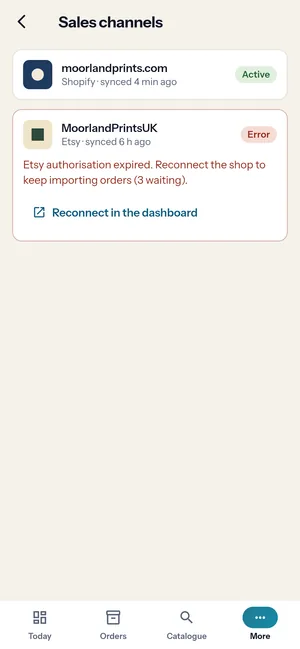
Printhawk shows each connected store’s status and Prodigi’s sync error text on its channels screen, and a broken store on its Today screen, so you notice before orders pile up. Setup guides: Etsy, Shopify, WooCommerce.
Questions
Why are my new products not showing in Prodigi?
New products usually appear within minutes, but Prodigi says it can take up to an hour. If not, check for a re-authorisation link on the Sales channels page, that the products are Active or Draft, and that the shop isn't in holiday mode.
Why did my Etsy product lose its Prodigi settings?
Editing or replacing a listing can make Etsy or Shopify report it as a new product, so Prodigi creates a new one. Turn off the old version and configure the new one.
Will reconnecting my store delete my product mappings?
Prodigi doesn't say a re-authorisation removes them. Deleting the channel is different: it removes the connection, so you would configure products again after connecting.
I changed my Shopify domain and orders stopped. Why?
Prodigi says changing a store's domain can break the connection. Delete the channel in Prodigi and connect the store again.
Sources
- Prodigi Print API v5 reference: SalesChannel, SalesChannelStatus, SalesChannelSyncStatus, SalesChannelType, sales channel disable/enable, auto-fulfilment rules (prodigi.com/print-api/docs), read 27 November 2026.
- Prodigi FAQ, Integrations, Etsy and Shopify (prodigi.com/faq), read 27 November 2026.