 Printhawk
Prodigi and Shopify: connecting your store
Updated
Connect Shopify from Sales channels in the Prodigi dashboard, wait for the import email, then set each product’s Prodigi SKU, artwork and shipping. Orders for configured products go to Prodigi automatically. Turn off Shopify’s “automatically fulfil orders” setting, or Prodigi’s tracking updates can’t reach the order. You need your own IOSS number.
Setting it up
- Create the products in Shopify first. Prodigi’s Shopify FAQ says products are created in the store and imported when you connect.
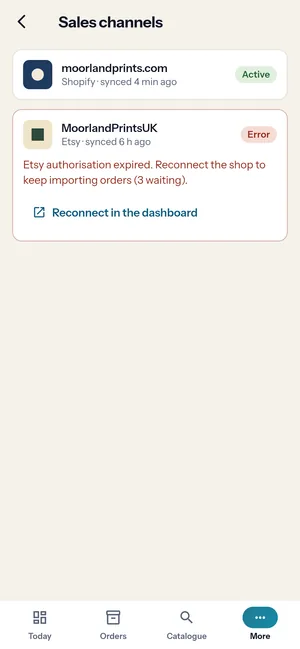
- Connect. In the Prodigi dashboard, open Sales channels and click “Connect your Shopify store”.
- Wait for the confirmation email (minutes for most stores). If it hasn’t come in an hour, disconnect and reconnect.
- Configure each product: the Prodigi product and size per variant, the artwork, the shipping speed (standard by default; budget or express available), and fulfilment on.
- Check two Shopify settings: turn off “automatically fulfil orders”, and set the shipping origin to your company address, as Prodigi recommends.
The Shopify app listings
When we checked on 27 November 2026, the Shopify App Store had two Prodigi listings:
- Prodigi: Print on Demand, the long-standing listing, showed “not currently available on the Shopify App Store”, with a note to contact Prodigi directly for support.
- Prodigi Global Print on Demand, by Prodigi Global Ltd, launched 31 July 2024, free to install, with only two reviews at the time.
Prodigi’s own instructions connect Shopify from the dashboard’s Sales channels page, so start there rather than from the App Store.
Shipping and personalisation
Prodigi doesn’t publish shipping profiles to Shopify yet; set your rates in Shopify from Prodigi’s price sheets (see shipping costs). For personalised products, leave the artwork blank, set your edit window to “Pause indefinitely”, and add each customer’s file before submitting. Multi-piece products such as triptychs use “Add another item” on the order.
Tax
Shopify sellers need their own IOSS number for low-value EU imports; Prodigi’s FAQ says registration, reporting and filing fall on the seller. Add it to your Prodigi settings so parcels carry it. Prodigi charges US sales tax on US-bound orders unless you provide a resale certificate. See tax settings.
Common Shopify problems
- Orders not marked fulfilled: Shopify’s auto-fulfil setting is on.
- Edited product lost its setup: Shopify reported it as new; turn off the old one in Prodigi and configure the new one.
- New products missing: wait up to an hour; products must be Active or Draft; look for a re-authorisation link.
- Store domain changed: delete the channel and reconnect.
More in sync errors. Deleting an unsubmitted order in Prodigi doesn’t touch the Shopify order. For choosing products and pricing, see Shopify print on demand.
Questions
How do I connect Shopify to Prodigi?
Sign up for a free Prodigi account, open Sales channels in the dashboard and click Connect your Shopify store. Prodigi imports your products and emails you when it is done.
Why doesn't Prodigi update my Shopify orders?
Prodigi says a Shopify store set to automatically fulfil orders stops its updates being shared. Turn that setting off so Prodigi can mark orders fulfilled with tracking.
Is the Prodigi Shopify app free?
The current listing, Prodigi Global Print on Demand, is listed as free to install; you pay Prodigi for each order. The older Prodigi: Print on Demand listing showed as not currently available on 27 November 2026.
What shipping origin should I set in Shopify?
Prodigi recommends your company address, because it routes each order to whichever facility suits it best and can't guarantee where an item ships from.
Do Shopify sellers need their own IOSS number?
Yes. Unlike Etsy, Shopify doesn't provide one; registration, reporting and filing fall on you.
Sources
- Prodigi FAQ, Shopify and Integrations (prodigi.com/faq/shopify, prodigi.com/faq/integrations), read 27 November 2026.
- Shopify App Store: “Prodigi: Print on Demand” (apps.shopify.com/prodigi-print-on-demand) and “Prodigi Global Print on Demand” (apps.shopify.com/prodigi-global-print-on-demand-1), read 27 November 2026.
- Prodigi Print API v5 reference: SalesChannelType, ProductMapping, AutoFulfilRule (prodigi.com/print-api/docs), read 27 November 2026.