 Printhawk
Reorder, quote and place a new order
Updated
Reorder repeats a past order; New order builds one from the catalogue. Both end with a live quote from Prodigi.
Steps: reorder
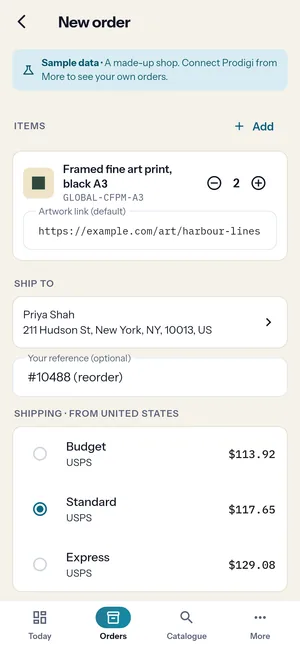
- Open the past order and tap Reorder. The same items, quantities, artwork links and recipient are filled in, and your reference gets “(reorder)”.
- Change quantities or the address if needed; the quote updates.
- Choose a shipping method. The header shows which lab country it ships from.
- Check You pay Prodigi, tap Place order and confirm with Face ID.
Steps: new order
- In Orders, tap + (or Order this on a catalogue size).
- Tap Add to pick products and sizes from the catalogue.
- Paste a public artwork link for each item.
- Add the recipient’s name and address, and your reference if you like.
- Pick shipping, check the totals and place the order with Face ID.
Good to know
- Reorder and New order are Printhawk Pro, and hidden in read-only mode.
- If your account has an edit window, you can still change or cancel the order until it ends.
- Try it first on a sandbox account: nothing is printed or charged.
How Prodigi prices orders: pricing, shipping costs and shipping times.
Questions
Can I upload artwork in Printhawk?
No. Each item needs a public https link to the artwork that Prodigi can download. A reorder reuses the original order's artwork links.
Are catalogue prices free to check?
Yes. In Catalogue, each size shows the artwork pixels it needs and Prodigi's cost to the UK, US, Germany and Australia with standard shipping. Placing orders is Pro.
Which shipping methods can I pick?
Whatever Prodigi's quote returns for the items and address: budget, standard, standard plus, express or overnight, each with its price and carrier where given.
Is the quote what I pay?
It is Prodigi's price to you for the items, shipping and tax at that moment, before your own margin. Prices can change, so the quote is refreshed when you change items or the address.