 Printhawk
The Prodigi dashboard: a tour, and doing the same from a phone
Updated
The Prodigi dashboard (dashboard.prodigi.com) is where you run your account: orders, the manual order form and CSV importer, sales channels, the image library and mockups, billing and invoices, branding, order pausing preferences, subscriptions and API keys. It works in a phone browser; Printhawk covers the daily order tasks in an iPhone app.
The main areas
Menu names change from time to time; these are the areas Prodigi’s FAQs and pages describe.
| Area | What you do there |
|---|---|
| Orders | Find and open orders, “Send now” on paused ones, cancel, edit, “Add another item”, remove, export (All orders, Export). |
| Create order / Import orders | The manual order form for one-off orders; the CSV importer for bulk orders. |
| Sales channels | Connect Etsy, Shopify, WooCommerce and others; configure products, shipping and fulfilment; re-authorise. |
| Image library, mockups, product preview | Store artwork, make mockups, preview products. |
| Pricing and shipping tool | Download price sheets by category and destination. |
| Account, Preferences | Order pausing (the edit window). |
| Settings, Billing | Card, PayPal or Direct Debit; Invoices (PDF, CSV, bulk ZIP). |
| Branding | Insert sets: packing slips, postcards, flyers, stickers, and which order methods use them. |
| Subscriptions | Prodigi Pro plan, billing cycle, next payment. |
| API settings | View and regenerate live keys (sandbox keys are in the sandbox dashboard). |
Live chat with Prodigi support is also in the dashboard, according to Prodigi’s customer support page.
Daily tasks and where they live
- Something stuck? Orders filtered by “Requires attention” or held. See order statuses.
- A customer changed their address: open the order and edit it while Prodigi allows (how).
- A store stopped syncing: Sales channels, re-authorise (sync errors).
- The accountant wants invoices: Settings, Billing, Invoices (invoices).
Doing the same from a phone
The dashboard opens in a mobile browser, but it is laid out for a computer. Printhawk, an independent iPhone app (not made by or affiliated with Prodigi), covers the order side through Prodigi’s Print API:
| Dashboard | In Printhawk |
|---|---|
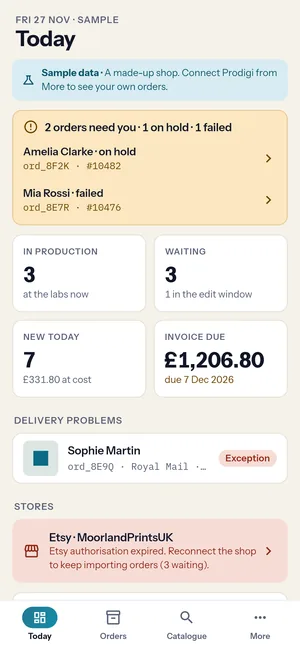
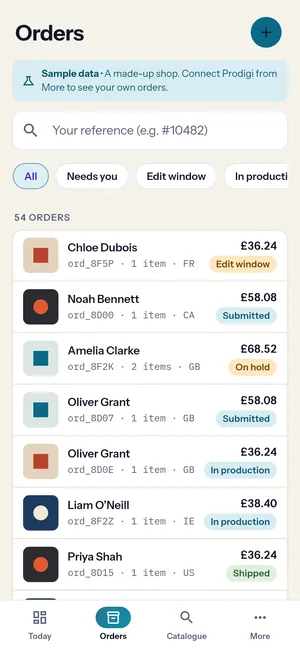
| Orders list and filters | Order list with filters and reference search; Today puts holds, failures and exceptions first |
| Order page | Production timeline, parcels, items, costs |
| Send now / cancel / edit address | Same actions (Pro), only when Prodigi allows, with Face ID |
| Manual order form | New order or reorder with a live quote (Pro); no artwork upload yet |
| Billing, Invoices | Invoice list and PDFs (Pro) |
| Sales channels | Each store’s status and sync error (view only) |
| Preferences | Shows your edit window (view only) |
Branding, the image library, mockups, product setup and API keys stay in the dashboard.
Questions
What is the Prodigi dashboard URL?
dashboard.prodigi.com for your live account. The sandbox has its own dashboard, linked from Prodigi's API documentation.
Where are API keys in the Prodigi dashboard?
In API settings. Prodigi's FAQ says you view, manage and regenerate keys there, with separate keys for sandbox and live.
How do I export my Prodigi orders?
Orders, All orders, Export: choose a date range and Prodigi emails a CSV with one row per item, including the product, tax code, price and invoice number where one exists.
Can I use the Prodigi dashboard on my phone?
Yes, in a mobile browser, but it is designed for a computer. Printhawk is an independent iPhone app that covers day-to-day order work through the Prodigi API.
Sources
- Prodigi FAQ: Ordering (order pausing, export), Integrations, Payments & pricing (invoices, pricing and shipping tool), Packaging (branding), Prodigi Pro (subscriptions), Print API (API keys) (prodigi.com/faq), read 27 November 2026.
- Prodigi, Customer support (prodigi.com/customer-support), read 27 November 2026.
- Prodigi Print API v5 reference: introduction (live and sandbox dashboards) (prodigi.com/print-api/docs), read 27 November 2026.