 Printhawk
Shopify print on demand: connecting a print lab to your store
Updated
On Shopify, a print lab connects as an app. You create products in Shopify, the lab imports them, and you link each variant to a lab product and artwork. Paid orders then go to the lab automatically, which prints, packs and ships them, and sends tracking back to Shopify for your customer.
What the integration does
A Shopify store on its own takes orders and payments. The print lab’s app adds the missing half: it reads new orders, works out which items it should make, sends them to production and writes the fulfilment (with tracking) back to the order. With Prodigi:
- You install the Prodigi Shopify app or connect from the Sales channels page of the Prodigi dashboard.
- Products must exist in Shopify first; Prodigi imports them, it doesn’t publish them for you.
- New products default to “Fulfilled by Prodigi”. You can mark products you make yourself as ignored, so a mixed store works.
- Shopify orders use Standard delivery by default; you can set Budget, Standard or Express per product in the product’s Shipping tile.
The step-by-step setup is in our Prodigi Shopify guide.
Mapping products and variants
Mapping is where most Shopify print-on-demand problems start. Each Shopify variant (for example “A3 / Matte / Black frame”) must point at exactly one lab product and one artwork file that fits it.
| Shopify variant | Lab product to link | Check |
|---|---|---|
| Size option | The lab SKU with the same size | The artwork’s shape matches; A sizes and inch sizes have different ratios |
| Paper option | The SKU for that paper | Same name in your shop as in the lab’s catalogue, so you don’t mix them up |
| Frame colour | The framed SKU and its colour attribute | Mount or no mount, as your photos show |
Check pixel needs before you link a big size: an A2 print at 300 dpi needs 4961 × 7016 pixels (see pixels to inches). Artwork that is too small can fail the lab’s checks and stop the order.
Shipping rates at checkout
Prodigi’s integration FAQ says shipping profiles are not yet published to your store, so you set delivery charges in Shopify yourself. Base them on the lab’s real shipping prices for your main destinations, not a guess: the lab charges you per order, whatever you charged the customer. Framed prints and canvases cost more to send; Prodigi says the largest item in the basket sets the shipping charge for framed prints and canvases. Our shipping guide covers methods and tracking.
Orders that stall, and how to see them
- Unmapped variants. A variant you add later won’t fulfil until it is linked.
- Payment holds. If the card on your lab account fails, orders go
on_hold(see orders on hold). - Disconnected store. Prodigi notes that changing your store’s domain can stop the connection, and that you then delete and reconnect it (sales channel errors).
- Carrier exceptions. The parcel is delayed or undeliverable after it left the lab.
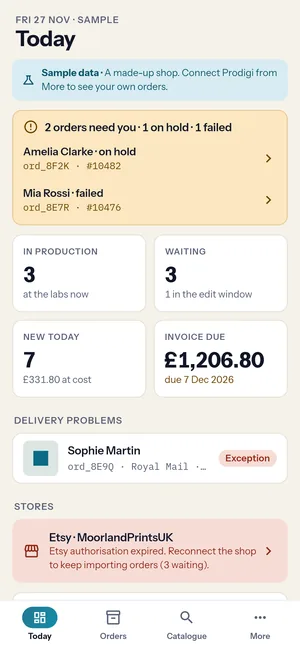
Printhawk is an iPhone app for Prodigi merchants: its Today screen lists these in one place, and the order screen shows the production timeline from lab scans. It doesn’t edit Shopify products.
Questions
How does print on demand work with Shopify?
You install a print lab’s app or connect the store from the lab’s dashboard, link each Shopify product and variant to a lab product with artwork, and paid orders are sent to the lab, which prints and ships them under your brand.
Does Prodigi work with Shopify?
Yes. Prodigi offers a Shopify app and describes it as the way for Shopify sellers to fully automate order fulfilment. You create products in Shopify first; Prodigi imports them for you to configure.
Which shipping method does the lab use for Shopify orders?
With Prodigi, Shopify orders go by Standard delivery by default, according to its integration FAQ. You can change the method per product to Budget, Standard or Express.
Do I pay the lab a monthly fee?
Prodigi says it is free to use, with no set-up fees or monthly subscriptions; you pay for each order’s products and shipping. Your Shopify plan and apps are billed separately by Shopify.
Sources
- Prodigi FAQ, Integrations (prodigi.com/faq/integrations), read 27 November 2026.
- Prodigi Help Centre, How can I integrate with Prodigi? (support.prodigi.com), read 27 November 2026.
- Prodigi FAQ, Shipping (prodigi.com/faq/shipping), read 27 November 2026.
- Prodigi home page, “No upfront costs” (prodigi.com), read 27 November 2026.
- A2 pixel counts calculated from 420 × 594 mm at 25.4 mm per inch.