 Printhawk
WooCommerce print on demand: how to connect a print lab
Updated
WooCommerce print on demand works by connecting your WordPress store to a print lab. You create the products in WooCommerce, the lab imports them, and you link each one to a lab product and artwork. New orders are then sent to the lab to print and ship, and status updates come back to the store.
Why sellers choose WooCommerce
WooCommerce is a free plugin that turns a WordPress site into a shop. You own the site and choose the hosting, theme and payment providers, and there is no marketplace fee on each sale. The trade-off is that you maintain it: plugin updates, hosting, security and backups are your job. For print on demand that matters, because the lab’s connection relies on your store being reachable and its API access staying valid.
How the lab connection works
With Prodigi, which lists WooCommerce among its integrations with automatic order processing:
- Create your products in WooCommerce, with a variation for each size, paper or frame you sell.
- Connect the store from the Sales channels page of the Prodigi dashboard and wait for the import.
- For each product, switch fulfilment on and link every variation to a Prodigi product with the right artwork.
- Orders are routed to Prodigi automatically. By default WooCommerce orders use Auto-select, which follows the shipping option the customer chose at checkout. You can set Budget, Standard or Express per product instead.
Because Auto-select follows the customer’s choice, name your checkout shipping options so they map clearly onto the lab’s methods (for example “Standard” and “Express”). See the Prodigi WooCommerce guide.
Integration or API?
| Route | Suits | You maintain |
|---|---|---|
| Lab’s WooCommerce integration | Most shops | Product links and the connection |
| Your own code on the lab’s API | Custom products, unusual checkouts, several labs | Order creation, error handling, tracking updates |
| Manual or CSV orders | Very low volume, or testing | Every order by hand |
If you build on the API, test with sandbox keys first; sandbox orders are not printed, shipped or charged. Start with our Prodigi API overview.
WordPress problems that break the sync
- Domain or URL changes. Prodigi warns that changing your store’s domain can stop the connection, and that you then delete and reconnect it.
- Security plugins and firewalls that block API requests from outside services.
- Products not published. Prodigi’s FAQ asks you to check products are Active or Draft when imports fail.
- Variations edited after linking. A renamed or recreated variation can lose its link; re-check after big catalogue changes.
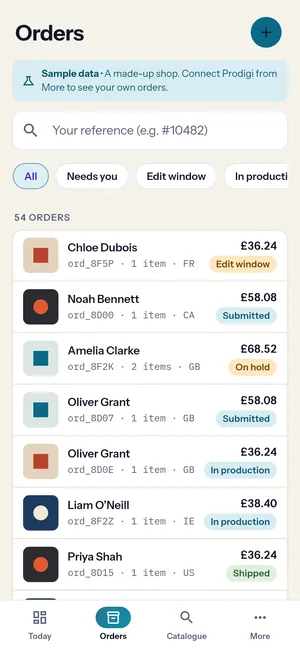
When the connection drops, orders keep arriving in WooCommerce but nothing reaches the lab. Check the lab’s order list against your store’s after any site change. Printhawk shows each Prodigi sales channel’s status and the order list on your iPhone; see sales channel errors.
Before you launch: a checklist
- Every variation linked to a lab product and artwork.
- Checkout shipping options named to match the lab’s methods, priced from its real costs.
- Tax settings set for where you sell (see VAT on print on demand).
- A test order placed to your own address and received.
- Delivery, damage and returns policies on the site.
- Backups and plugin updates scheduled, so the store stays reachable.
Questions
Can I do print on demand with WooCommerce?
Yes. Several print labs connect to WooCommerce, including Prodigi, which lists WooCommerce among its sales channel integrations with automatic order processing.
Which shipping method does Prodigi use for WooCommerce orders?
Prodigi’s integration FAQ says WooCommerce orders default to Auto-select, which uses the shipping option the customer chose at checkout. You can override it per product.
Will the lab create my WooCommerce products?
Not with Prodigi. You create products in WooCommerce first, connect the store, and Prodigi imports them so you can link each one to a lab product and artwork.
Why did my WooCommerce orders stop reaching the lab?
Common causes are an expired connection that needs re-authorising, a changed store domain, or products that are not active. Reconnect from the lab’s sales channels page and check the order list for anything missed.
Sources
- Prodigi FAQ, Integrations (prodigi.com/faq/integrations), read 27 November 2026.
- Prodigi blog, Shopify, Etsy, Wix, BigCommerce, WooCommerce, Adobe Commerce and Squarespace integrations (prodigi.com/blog/ecommerce-integrations), read 27 November 2026.
- Prodigi Print API v5 documentation, sandbox and live keys (prodigi.com/print-api/docs), read 27 November 2026.