 Printhawk
Privacy and security
Updated
Your Prodigi key can place and cancel orders on your account, so Printhawk treats it carefully.
Your API key
- Stored in the iPhone Keychain, set to this device only and available after the phone is first unlocked. It is not kept in the app’s ordinary settings.
- Sent only to
api.prodigi.com, in theX-API-Keyheader Prodigi’s API requires. There is no Printhawk server in between. - Shown masked, for example
live_7c1e••••a90d. - Removed when you disconnect the account (More › tap the account › Disconnect).
Changes need you
- Sending to the lab, cancelling, changing an address, reporting a problem and placing an order all show a confirm sheet first, then ask for Face ID or your passcode.
- Buttons only appear when Prodigi allows the action for that order.
- Read-only mode hides them all for an account.
Crash reports
- Printhawk can send crash and error reports to Sentry, with personal data removed on the device before sending.
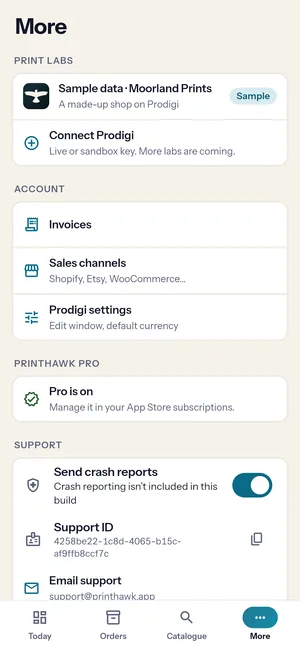
- Turn it off in More › Send crash reports; reports stop at once.
- The Support ID in More is an anonymous ID you can quote when you email support.
Steps: lock things down
- Use a sandbox key while you try the app (sandbox and live).
- Turn on read-only for live accounts you only want to watch.
- Switch off crash reports if you prefer.
- Disconnect accounts you no longer use.
Full details in our privacy policy. Printhawk is independent and not affiliated with Prodigi.
Questions
Does Printhawk have a server that sees my key or orders?
No. The app talks to Prodigi's API (api.prodigi.com) directly from your iPhone, and the key is only ever sent there.
Is the key in my iCloud backup?
The key is saved in the Keychain for this device only, so it doesn't move to a new phone with a backup. Printhawk drops that account and you connect again.
Can someone with my unlocked phone cancel orders?
Every change asks for Face ID (or your passcode) after a confirm sheet. For extra safety, turn on read-only for the account.
Can I turn off crash reports?
Yes. More › Send crash reports. Turning it off stops reports straight away.